 Product Personaliser
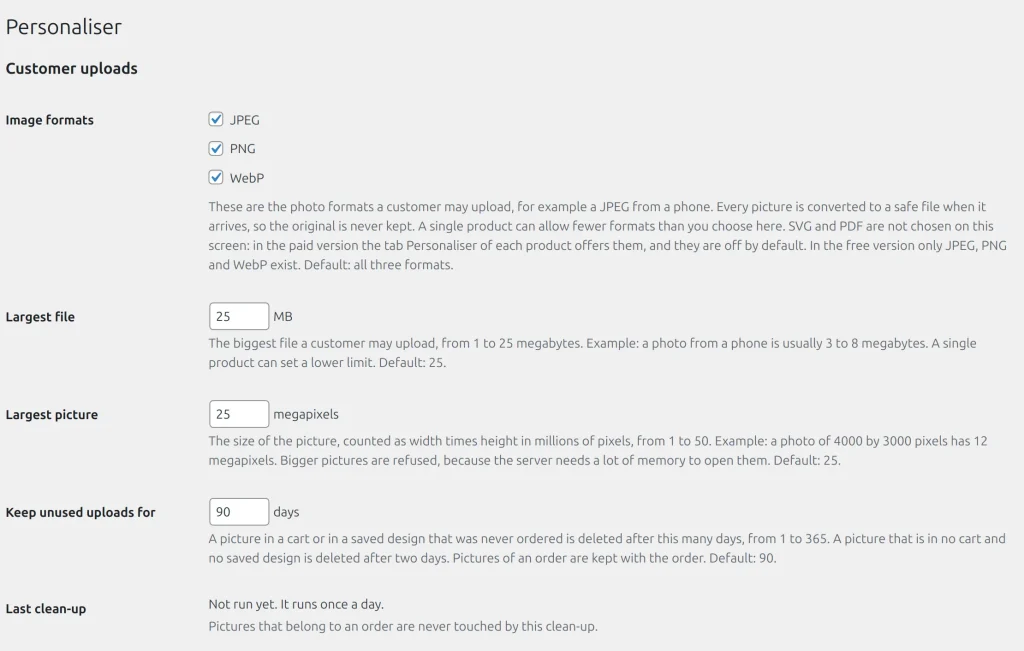
What is accepted
JPEG, PNG and WebP, judged by content and not by name, limited by size and pixels. A product may allow fewer formats than the shop, never more. In the paid build a product may also accept SVG (up to 2 MB, cleaned) and PDF (up to 10 MB and 100 pages, checked and kept unchanged); both are off by default. The browser turns the first page or the cleaned drawing into a picture, and the drawing is kept for the print file.
How pictures are stored
- Every picture is decoded and re-encoded without metadata; the original is never kept.
- Files sit in
uploads/personaliser-private/under random names. Only the owner and shop staff can see a picture. - A picture waits 48 hours for a cart line or a saved design, then follows the retention days you set. A picture on an order stays with the order.
- Limits: 20 uploads per hour per visitor and 60 per network address.
Privacy
The WordPress export and erase tools include uploaded pictures and, in the paid build, saved designs. Deleting an order removes its pictures; deleting an account removes its saved designs. Network addresses are stored only as a hash.
Steps
- In Settings > Customer uploads choose the image formats, the largest file and the largest picture.
- Under Keep unused uploads for choose the number of days.
- On a product set Allowed file types and the largest file.
Example
A customer asks for her data to be erased. The shop owner uses the WordPress privacy tools; the pictures of her orders and her saved designs are removed.
Related topics
Was this page helpful?
Report an errorApplies to version 0.1.0.