 Product Personaliser
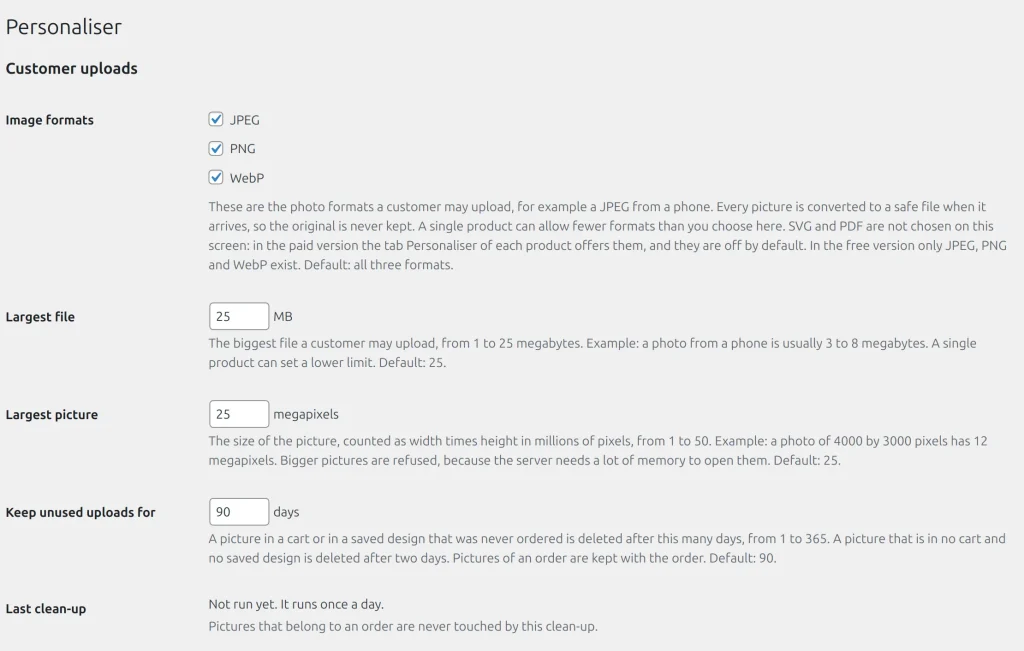
One form saves all sections. A refused value shows a message at its field and the previous value is kept. The free build shows only the free sections.
| Option | What it does | Default | Build |
|---|---|---|---|
| Image formats | JPEG, PNG, WebP a customer may upload; at least one stays on | all three | Free |
| Largest file | Megabytes, 1 to 25 | 25 | Free |
| Largest picture | Megapixels, 1 to 50; bigger pictures are refused unopened | 25 | Free |
| Keep unused uploads for | Days, 1 to 365, for a picture in a cart line and for an unnamed saved design | 90 | Free |
| Last clean-up | Read only: when the daily clean-up ran and what it deleted | none | Free |
| Private folder | Read only: the nginx rule that protects the folder | none | Free |
| Add to the cart without reloading the page | See Add to cart without reloading | off | Free |
| Colour attribute | The WooCommerce attribute that holds the colour list | Colour | Free |
| Header with the visitor address | None, X-Forwarded-For, CF-Connecting-IP or X-Real-IP; decides which address the per-address limits count | None | Free |
| Saving designs | Guests may save designs, or an account is required | guests may | Paid |
| Keep guests' designs for | Days, 1 to 365 | 30 | Paid |
| Customers must approve a proof | Shop default for products set to "Same as the shop" | No | Paid |
| Coupons | How coupons act on personalised products | whole price | Paid |
| Production e-mail recipients | Addresses separated by commas | the shop address | Paid |
Set the visitor address header only when your host puts the real address there. If visitors can write the chosen header, they can avoid the per-address limits.
Example
A shop behind a content delivery network sees every visitor from one address. The owner picks the header the network sets, and the per-address limits count real visitors again.
Related topics
Was this page helpful?
Report an errorApplies to version 0.1.0.