 Product Personaliser
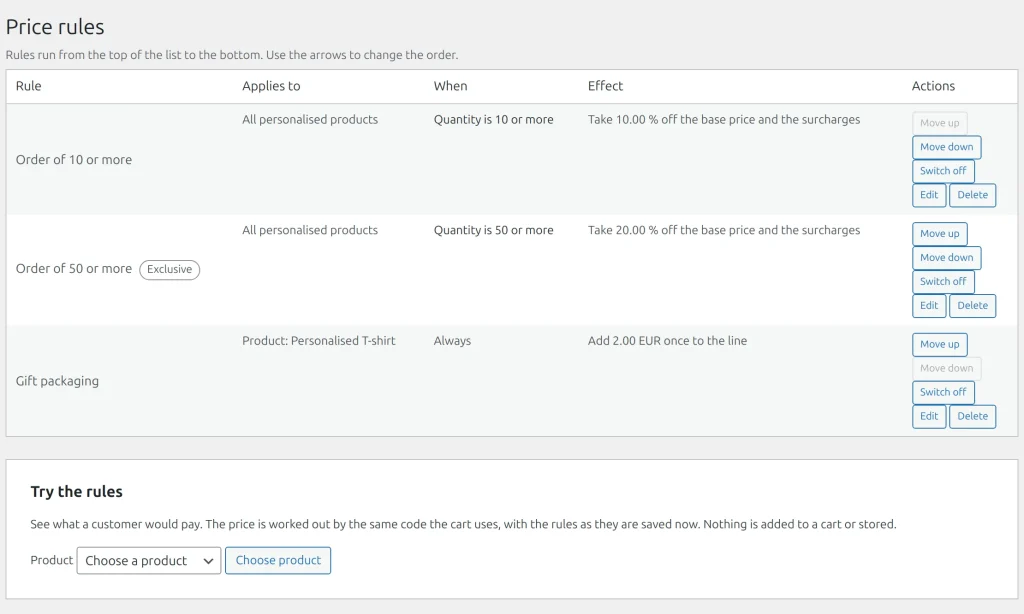
Steps
Open Personaliser > Price rules and fill Add a rule.
- What the rule is about: Name, Applies to (all personalised products, one product, or a category with its subcategories) and With other rules (works together, or Exclusive).
- When it applies, all conditions together: Quantity from and to, Something is printed on (a used print area or whole view), Product colour is, a form answer (Field name, Comparison, Value: is filled in, is, is not, is at least, is at most) and a First day and Last day, both included.
- What it does, one of:
- A fixed amount, per unit or once per line.
- A percentage of the product price, the surcharges or both.
- A step: an amount for each character of text, different text colour, print area used, square centimetre of used print area or unit, with the first N not counted.
- A lowest price for one unit.
- Direction: Add to the price or Take off the price.
- Press Add rule.
Order and stacking
Rules run from the smallest position; move up and move down renumber them. Adjustments run first, floors after. Percentages are taken of the price as it was before any rule ran. An exclusive rule shuts out later rules of the same scope. A discount never takes a line below zero. Once-only amounts become a "Set-up fees" line.
Try the rules prices a chosen product with the saved rules without storing anything.
Example
Engraving: "0.20 for each character after the first 10". A buyer who types 25 characters pays for 15, and the price breakdown shows the rule.
Related topics
Was this page helpful?
Report an errorApplies to version 0.1.0.