 Product Personaliser
Steps
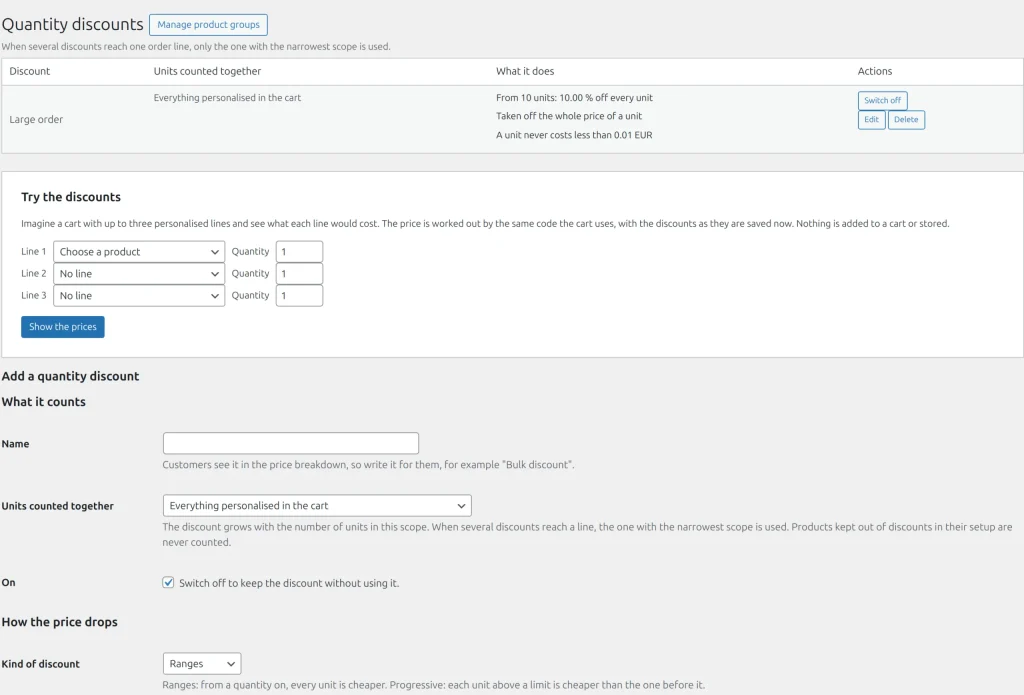
- Open Personaliser > Quantity discounts and fill Add a quantity discount.
- Units counted together: a line, a product (all its lines together), a product group or the whole cart. Only personalised lines count. When several discounts reach a line, the narrowest scope applies.
- Kind of discount:
- Ranges: tiers start at ascending quantities ("From" and "Discount"). Every unit gets the reduction of the tier the units reach. Below the first tier nothing.
- Progressive: the first N units cost full price and each next unit is cheaper by one more step.
- Taken off: the whole price of a unit, or the surcharges only.
- Lowest price of one unit: a unit never costs less. Set-up fees are never discounted.
- Press Add discount.
On the product
On the product tab, Show a price table on the product page shows up to 8 rows of the price of one unit and of the line; Tell the customer how many more units give a lower price shows the hint "Add N more to pay X each". Keep this product out of quantity discounts removes both its discount and its units from any scope. Product groups are managed under Manage product groups.
Try the discounts prices up to three products in one cart without storing anything. A product page counts only its own line, not units already in the visitor's cart.
Example
A shop gives 10% off every unit from 10 pieces of any personalised product in the cart. A buyer who adds 6 mugs and 4 T-shirts reaches 10 and the whole cart is discounted.
Related topics
Was this page helpful?
Report an errorApplies to version 0.1.0.